

Not every employer wants an English CV. A masjid committee hiring an imam, a madrassa looking for a Nazra teacher, a union council office or a small school in your town will often read an Urdu page faster and trust it more. The trick is getting the labels and the layout right.
Quick answer: a biodata form in Urdu uses the same sections as an English one, written right to left: نام، ولدیت، تاریخِ پیدائش، شناختی کارڈ نمبر، ڈومیسائل، تعلیم، تجربہ، پتہ اور موبائل نمبر. Keep one line per label, write dates the Urdu way (۱۴ مارچ ۱۹۹۸), and match every detail to your CNIC and certificates. A full sample is below.
When you need a biodata in Urdu
An Urdu biodata is the right choice when the person reading it is more comfortable in Urdu, or the job itself is in Urdu. Common cases in Pakistan:
- Masjid and madrassa posts: imam, khateeb, moazzin, Qari, Nazra or Hifz teacher. Committees and mohtamim sahib usually expect Urdu.
- Local government and district offices: naib qasid, chowkidar, driver, clerk and similar posts, where the office works in Urdu day to day.
- Some school jobs: Urdu-medium schools, Islamiat or Urdu teacher posts, and village or tehsil-level schools. If you are a teacher, see our teacher biodata format guide for what to put in the subjects and classes lines.
- Elders and family: when a biodata is going to a grandparent, a local notable or a community elder who will recommend you.
- Admissions: some madrassas and Urdu-medium institutions ask for student details in Urdu.
If the advert, the website or the application form is in English, send English or bilingual instead. The simplest rule: answer in the language you were asked in.
Labels on a biodata form in Urdu, with English meanings
These are the labels families and offices actually use. Copy the Urdu column as it is.
| اردو | English |
|---|---|
| نام | Name |
| ولدیت | Father's name |
| زوجہ / شوہر کا نام | Wife's / husband's name (if asked) |
| تاریخِ پیدائش | Date of birth |
| شناختی کارڈ نمبر | CNIC number |
| ڈومیسائل | Domicile (district) |
| مذہب | Religion |
| قومیت | Nationality |
| ازدواجی حیثیت | Marital status (شادی شدہ / غیر شادی شدہ) |
| تعلیمی قابلیت | Education |
| پیشہ ورانہ تجربہ | Work experience |
| مہارتیں | Skills |
| زبانیں | Languages |
| موجودہ پتہ | Current address |
| مستقل پتہ | Permanent address |
| موبائل نمبر | Mobile number |
| دستخط | Signature |
For the education section, the usual column headings are سند / امتحان (degree or exam), بورڈ / یونیورسٹی, سال and حاصل کردہ نمبر (marks obtained).
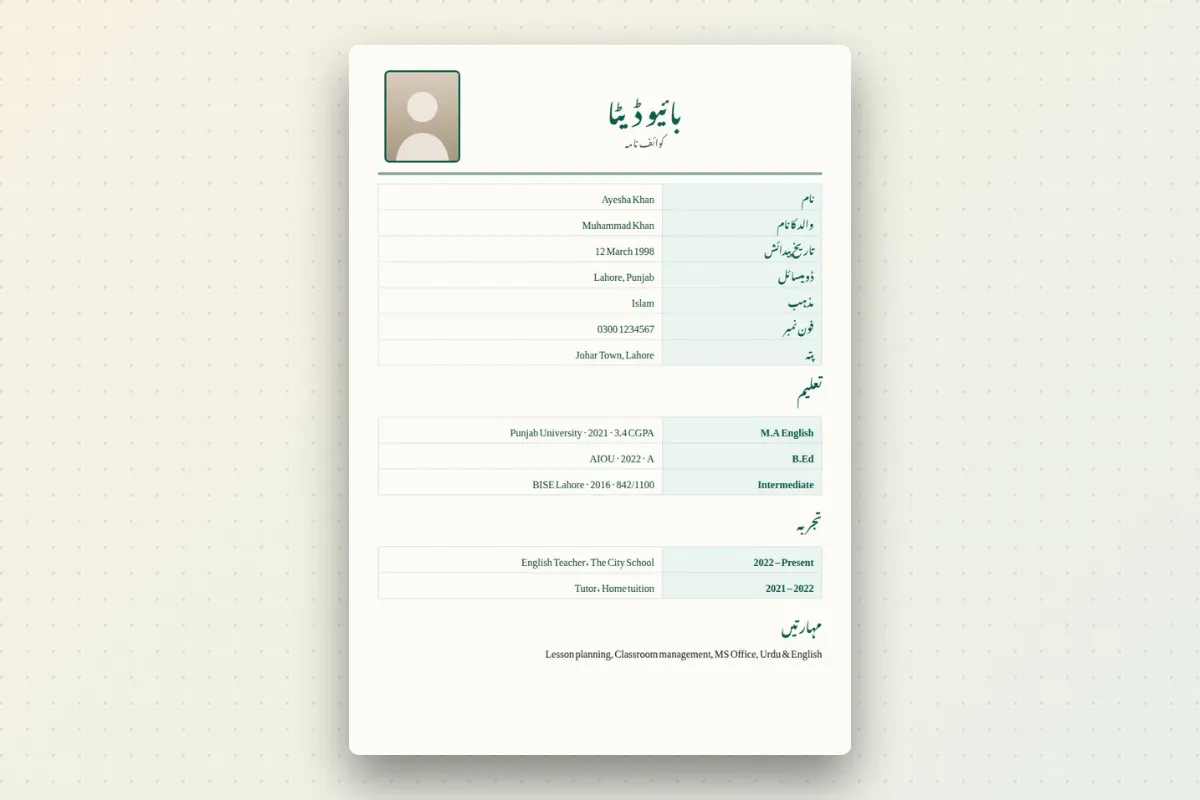
A full biodata in Urdu: filled sample
Here is a realistic example for a Nazra and Hifz teacher post at a madrassa in Faisalabad. The CNIC number is a placeholder.
بائیو ڈیٹا
نام: حافظ محمد عثمان
ولدیت: محمد اشرف
تاریخِ پیدائش: ۱۴ مارچ ۱۹۹۸
شناختی کارڈ نمبر: ۳۳۱۰۰-۰۰۰۰۰۰۰-۰
ڈومیسائل: فیصل آباد، پنجاب
مذہب: اسلام
ازدواجی حیثیت: شادی شدہ
تعلیمی قابلیت: حفظِ قرآن (۲۰۱۱)؛ میٹرک، فیصل آباد بورڈ، ۲۰۱۴، ۸۱۲ نمبر؛ ایف اے، فیصل آباد بورڈ، ۲۰۱۶
دینی تعلیم: درسِ نظامی، وفاق المدارس العربیہ، ۲۰۲۲
تجربہ: ناظرہ و حفظ کی تدریس، مدرسہ تعلیم القرآن، غلام محمد آباد، ۲۰۱۹ تا حال
مہارتیں: تجوید، قرأت، بچوں کی تربیت، حاضری اور نتائج کا ریکارڈ
زبانیں: اردو، پنجابی، عربی (پڑھنا)
پتہ: مکان نمبر ۱۲، گلی نمبر ۴، غلام محمد آباد، فیصل آباد
موبائل نمبر: 0300-1234567
Notice what it does well: one fact per line, the board and year next to every exam, and the current job written with "تا حال" (to date). Anyone can read it in under a minute.
For a clerk or office job, swap دینی تعلیم for a computer course line, for example: کمپیوٹر کورس: ایم ایس آفس، تین ماہ، ۲۰۲۳.
Urdu only or bilingual?
A fully Urdu biodata reads right to left from top to bottom and suits masjid, madrassa and local posts where everyone reads Urdu. It looks respectful and familiar.
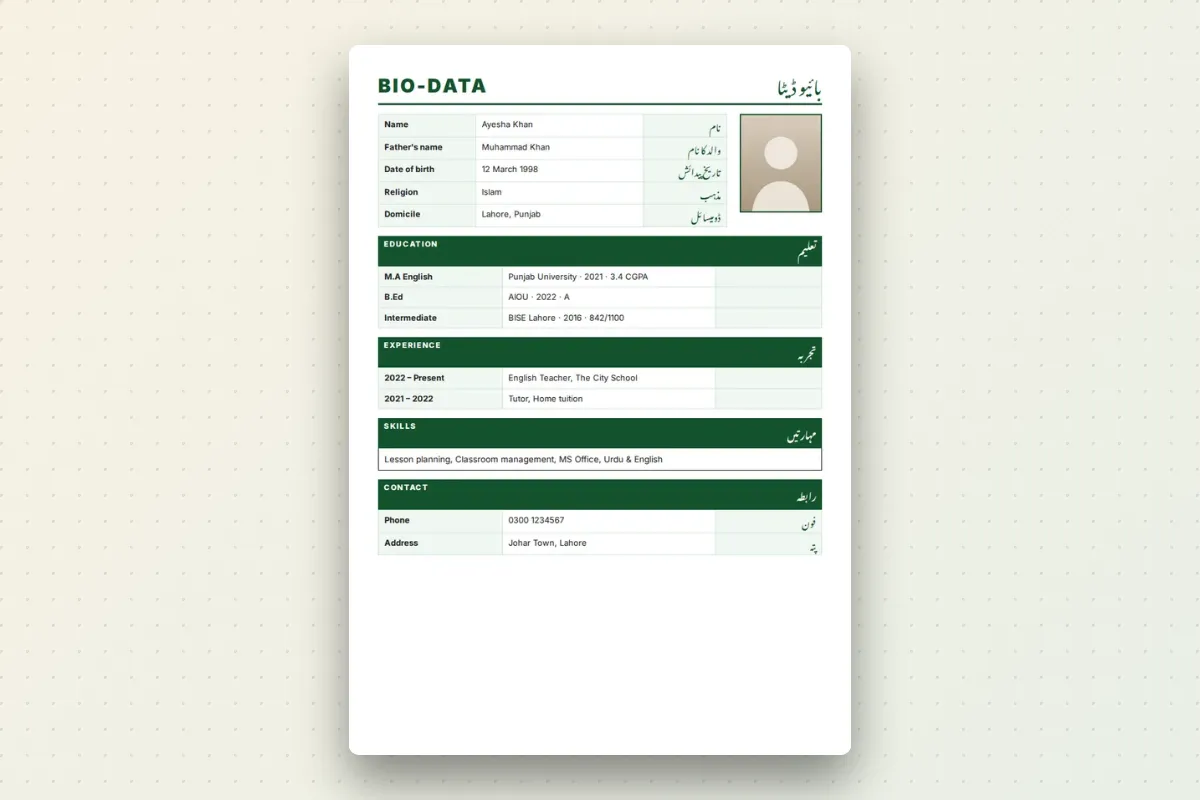
A bilingual biodata puts English and Urdu labels side by side (Name / نام, Father's Name / ولدیت), with your answers usually in English. It works well when:
- The office works in Urdu but files are checked against English documents.
- A private school or company has Urdu-speaking owners and English-speaking admin staff.
- You are sending the same page to several places and are not sure who will read it.
On the Urdu biodata maker you can choose either the fully Urdu right-to-left design or the Bilingual English + اردو design, and switch between them without retyping anything.
Writing dates and numbers in Urdu
Urdu has its own digits: ۰ ۱ ۲ ۳ ۴ ۵ ۶ ۷ ۸ ۹. The shapes of 4, 6 and 7 differ slightly from Arabic and Persian, which is why an Urdu font matters (see the note on Eastern Arabic numerals). A few habits that make your biodata look right:
- Dates: write ۱۴ مارچ ۱۹۹۸, or ۱۴-۰۳-۱۹۹۸ if the form wants numbers only. Use the English month names Pakistanis actually say: جنوری، فروری، مارچ، اپریل.
- Years of experience: ۲۰۱۹ تا ۲۰۲۲, or ۲۰۱۹ تا حال if you still work there.
- Marks: ۸۱۲ / ۱۱۰۰ or ۸۱۲ نمبر. Add the percentage only if the form asks.
- CNIC and mobile: Urdu or English digits are both fine. English digits are easier to copy and dial, so many people keep these two in English.
Pick one style and stay with it. Mixing ۲۰۱۹ and 2019 on the same page looks careless.
Common mistakes in Urdu biodata
- Google Translate labels. Phrases like "پہلا نام" or "پیدائش کی جگہ کا نام" read oddly. Use the standard labels in the table above.
- Writing "ولد" with your own name. "محمد عثمان ولد محمد اشرف" is fine in a sentence, but on a form keep نام and ولدیت on separate lines.
- Spellings that do not match documents. If your certificates say محمد عثمان, do not write عثمان محمد. Clerks compare line by line.
- English words left in English script. Write ڈومیسائل، میٹرک، ایف اے، بی اے in Urdu letters; they are standard in Urdu forms.
- Left-aligned Urdu. Urdu typed into an English template ends up flush left with broken punctuation. Use a proper right-to-left design.
- Too much detail. One page is enough. Skip hobbies unless they help, such as قرأت competitions for a madrassa post.
Making it on your phone
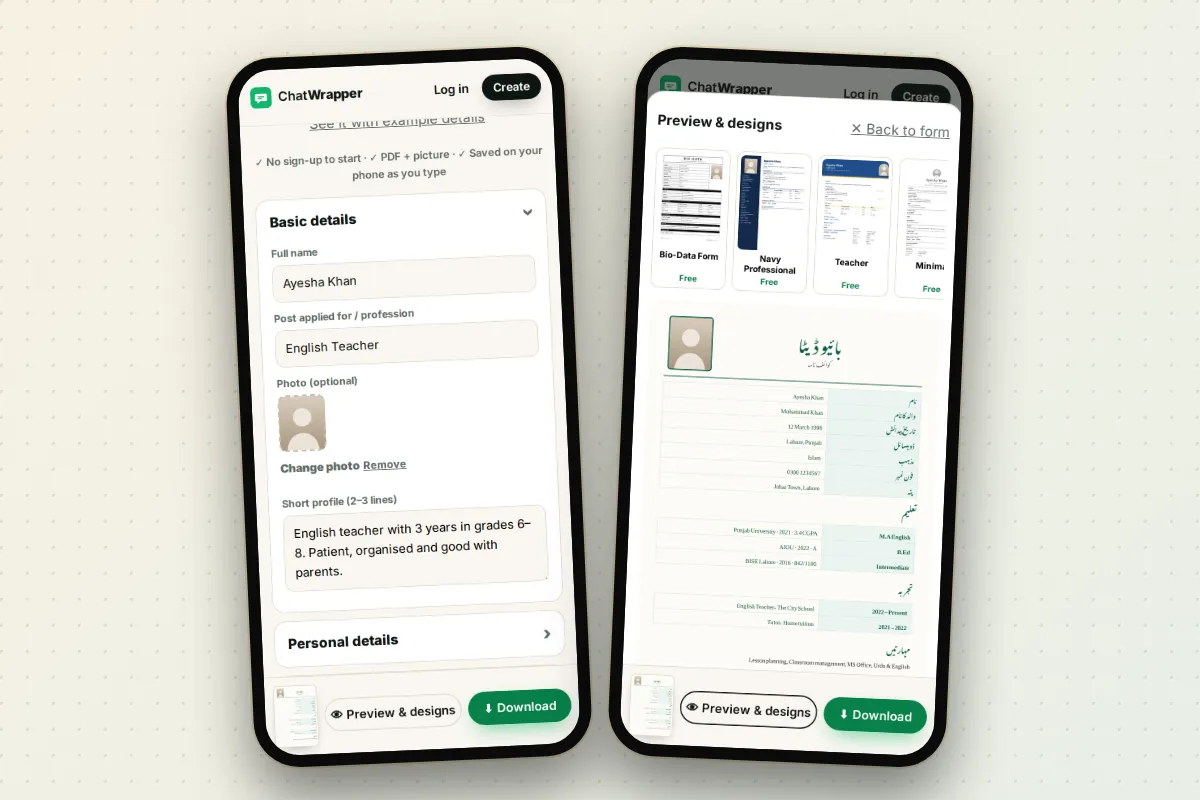
Typing Urdu into a Word file on a phone is painful: the text jumps, the alignment breaks and the font changes. On ChatWrapper you fill the fields on your phone and see the Urdu design update in a live preview as you type. The photo is optional, and your CNIC number is only used to make the file, never stored.
When it looks right, download a PDF to print or a picture to send on WhatsApp. If you also need an English version for another job, the biodata form keeps the same details in an English design, and you can compare all the looks in the biodata templates gallery. For a walkthrough in Roman Urdu, read biodata kaise banaye.


