

"Biodata bhej dein." It is the first step of almost every rishta now, and it usually happens on WhatsApp. Within an hour, your biodata may sit in the phone of a rishta aunty, three khalas and a family you have never met.
Quick answer: a good rishta biodata format follows a fixed order: a short heading, then basic details (city, age, height, qualification, occupation, religion and sect, language, native town), then family details, then a few lines of preferences. Keep it on one picture that fits a phone screen, make the name and photo optional, and keep contact details to one family number.
Why the format matters on WhatsApp
A rishta biodata is not read at a desk. It is opened on a phone, often by an elder, often while forwarding it to someone else. That changes what works:
- One screen, portrait. A tall 4:5 picture reads without zooming and does not get cropped in chat previews.
- Clear order. Families scan for age, education, job and family first. If those are in the same place every time, your biodata feels familiar and easy.
- Short lines. "MBA, Bank Officer" reads better than a paragraph.
- Safe to forward. Assume strangers will see it. Write nothing you would not want a stranger to know.
The rishta biodata maker is built around this: it makes a 4:5 picture for WhatsApp, a PDF, and a "copy WhatsApp text" version in the plain format families already forward.
The rishta biodata format, section by section
1. Heading
Either the name ("Biodata: Sana Ahmed") or, if you prefer privacy, a simple "Rishta for our daughter" or "Rishta for our son". Many families start without the name and share it later.
2. Basic details
This is the part everyone reads first. Keep each item to one line:
- City where the family lives now.
- Age in years (not the full date of birth).
- Height in feet and inches, e.g. 5'4".
- Qualification: the highest degree and institute, e.g. "MBBS, Fatima Jinnah Medical University".
- Occupation: job title and type of employer, e.g. "Software engineer at a private company".
- Religion and sect: e.g. "Islam, Sunni".
- Language spoken at home: Urdu, Punjabi, Pashto, Sindhi, Saraiki and so on.
- Native town: where the family is originally from.
- Caste (optional) and monthly income (optional). Add them only if your family wants them on the first page.
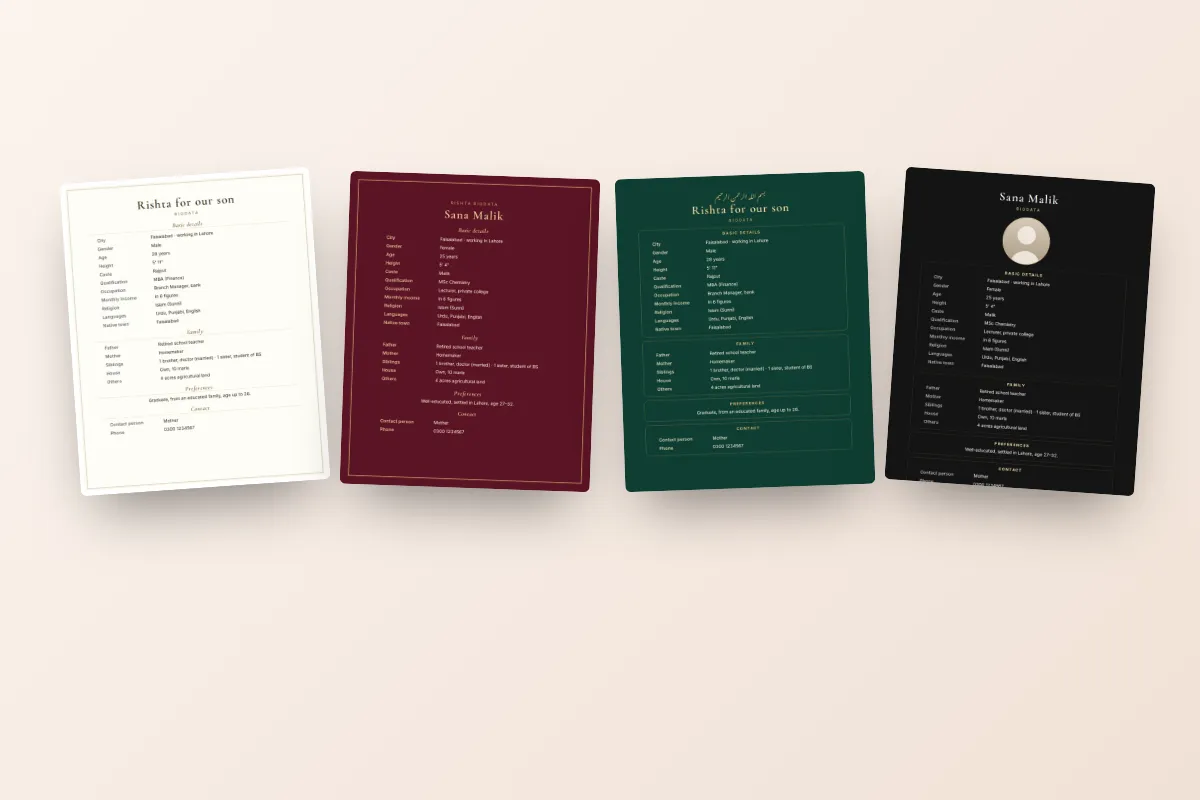
3. Family details
Short and factual. Father's occupation (or "retired government officer"), mother ("housewife" or her profession), number of brothers and sisters with a word on each ("1 brother, married, engineer in Islamabad"), and the house ("own house, DHA Lahore" or simply "own house"). Families care about this section as much as the person's own details.
4. Others
A line or two that makes the person real: "Hafiz-e-Quran", "enjoys cooking and reading", "lived in Dubai for six years", "planning to settle in Pakistan". Keep it simple and honest.
If the family lives abroad, say so clearly in this section: "Family settled in Manchester for 15 years, visits Pakistan every winter" or "Working in Riyadh on a long-term contract". Families in Pakistan want to know early whether the rishta means moving abroad, and families in the UK, UAE or Saudi Arabia appreciate the same honesty in return.
5. Preferences
Two or three polite lines about what the family is looking for: age range, education level, city or country, and anything that genuinely matters. Write it as a hope, not a demand.
6. Contact
One number, usually the father's, mother's or an elder sibling's. Not the boy's or girl's personal number on the first send.
Marriage biodata sample (WhatsApp format)
Here is a filled-in example for an example family, laid out the way it reads on a phone:
| Section | Sample |
|---|---|
| Heading | Rishta for our daughter |
| City | Lahore |
| Age / Height | 26 years / 5'4" |
| Qualification | MBBS |
| Occupation | Medical officer at a private hospital |
| Religion / Sect | Islam / Sunni |
| Language / Native town | Urdu, Punjabi / Sialkot |
| Father | Retired bank manager |
| Mother | Housewife |
| Siblings | 1 brother (married, engineer, Islamabad), 1 sister (studying, BS) |
| House | Own house, Lahore |
| Others | Enjoys reading and cooking, practising, close to family |
| Preferences | Educated, well-mannered family. Boy 28–33, settled in Lahore or Islamabad. |
| Photo | Shared on request |
That is all a first message needs. Everything else comes in conversation once both families are interested.
Picture, PDF or text: what to send
Each has a job:
- Picture: the first impression. A clean design in soft colours looks cared-for and respectful. It is what most people open first.
- Text: rishta groups, aunties and matchmakers often copy and paste text rather than images. Plain text also shows up in WhatsApp search later.
- PDF: for elders who print things, or for families abroad sharing over email.
Sending the picture with the text underneath covers everyone.
Choosing a design
A rishta biodata should feel warm and dignified, not flashy. Ivory and cream designs suit traditional families, green designs such as Emerald and Modern Green feel fresh, and Black & Gold or Royal Maroon feel formal. If you are sending without a photo, Ivory Monogram is made for exactly that. You can browse all nine in the rishta biodata templates and switch between them at any time without retyping.
Common format mistakes
- A long paragraph instead of lines. Elders give up halfway.
- Full date of birth, home address and CNIC. None of these belong on a biodata that will be forwarded.
- Five photos in a collage. One good photo, or none with "shared on request", is more respectful.
- A list of demands as preferences. "Fair, slim, tall, rich" puts good families off.
- Different details in the picture and the text. Check that age, height and job match everywhere.
- Tiny text on a landscape image. Use a portrait layout so it is readable on a phone.
Making it in a few minutes
On the rishta biodata page you type the details once on your phone and watch the live preview. Turn the name off and the heading becomes "Rishta for our son" or "Rishta for our daughter". Turn the photo off and it says "Photo shared on request". Your details stay saved on your phone as you type, so you can stop and come back to it later. Then download the WhatsApp picture, the PDF, or copy the ready-made WhatsApp text. Every design is free.
A rishta begins with a few lines on a phone screen. Make them clear, honest and kind, and the right family will want to know more.
