

Quick answer: WhatsApp chat statistics are the numbers hiding inside your conversations: who texts more, who replies fastest, what time you chat most and which emoji you cannot live without. Export a chat, run it through an analyzer and you get the full picture in about a minute.
Below are 12 stats worth checking, what each one measures and what it might (very unofficially) say about you. A small disclaimer before we start: this is for fun, not relationship science. A slow reply time does not mean your jaan has lost interest. It probably means they were at a mehndi with no signal.
What WhatsApp chat statistics can tell you
Every chat leaves a trail of timestamps, names and words. Counted up, that trail turns into surprisingly personal numbers. A good WhatsApp chat analyzer reads your exported chat and pulls out totals, patterns and highlights you would never notice while scrolling.
The fun part is not the numbers themselves. It is the arguments they start. "See, I told you I text first every time" is a sentence that has launched a thousand screenshots.
12 WhatsApp chat stats and what they say about you
1. Total messages
The headline number. It measures how many messages the two of you have sent since the chat began. A huge total usually means you talk about everything, including what you had for lunch and a detailed review of the rishta aunty who visited last week.
2. Who texts more
This is the split of messages between you, shown as a percentage. A 50/50 split looks balanced. A 70/30 split usually means one person narrates their whole day while the other replies "haha" between meetings. Neither is wrong, but one of you will definitely bring it up at dinner.
3. Who texts first in a relationship
The first message ever sent is often the most loved stat on any poster. Was it a formal "Assalam o Alaikum, hope you are well"? A forwarded meme? A "hey" that took three drafts? Knowing who texts first in a relationship settles an old debate, even if the loser insists "it doesn't count because I messaged on Instagram first."
4. Average reply time
The ghost detector. Reply time shows how quickly each person usually responds. One of you replies in under a minute; the other replies six hours later with "sorry just saw." Playfully speaking, the fast replier is the one with their phone permanently in hand, and the slow one is either very busy or very chilled.
5. Peak hour
The hour of the day when you send the most messages. If yours lands at 2 AM, congratulations, you are certified night owls. Late-night peaks are classic in long-distance chats and in every couple who promised "last message, sleeping now" at 11 PM.
6. Busiest day
The single date with the most messages. It is usually tied to a story: a result day, a fight that needed forty paragraphs, the night before the baraat, or the day the whole plan changed. Looking up your busiest day is a quick trip down memory lane.
7. Longest streak
The most consecutive days you messaged each other. This is where the "good morning" people shine. If one of you has sent a sunrise greeting with a flower GIF every day for a year, the streak is proof of commitment (or of a very strong alarm habit).
8. Top emojis
Your emoji personality. Someone who lives on the crying-laughing face is the audience; someone who sends hearts on everything is the softie; someone who replies with a single thumbs-up is, let's be honest, mildly terrifying. Your top five emojis often describe the relationship better than words.
9. Total emojis
Not which emojis, but how many. A high count means an expressive chat. A very low one means you are the kind of people who type "lol" in full and mean it seriously.
10. Total words
This is where the essay writer gets exposed. Compare words to messages and you see who sends "ok" and who sends a three-paragraph reply to "what should we eat?" Every friendship and every couple has one of each.
11. "I love you" count
How many times those three words appear in the chat. Some couples say it every night; some say it twice a year and both times it counted. Either way, it is the stat people screenshot the most.
12. Days of chatting
The number of days between the first message and today. It turns "we have been talking for ages" into an actual figure, which makes it perfect for anniversaries and shaadi countdowns.
A quick guide to the stats
| Stat | What it measures | The playful reading |
|---|---|---|
| Who texts more | Message split between people | The narrator vs the listener |
| Reply time | How fast each person responds | Instant replier vs the friendly ghost |
| Peak hour | Most active hour of the day | Morning people or 2 AM philosophers |
| Longest streak | Consecutive days of chatting | The "good morning" loyalty test |
| Top emojis | Most used emojis | Your emoji personality |
| "I love you" count | Times the phrase appears | Softie score |
Texting habits in relationships: take the numbers lightly
Texting habits in relationships vary hugely. Some people love long chats; others would rather call, or save everything for when they meet. A lower message count does not mean less love, and a slow reply time does not mean less effort.
So treat WhatsApp chat analysis for couples as a conversation starter, not a verdict. The best use of these stats is laughing together about who really is the "ok" sender, not keeping score.
How to see WhatsApp message count and your own stats
WhatsApp does not show message counts inside the app, so the trick is to export the chat and let a tool do the counting. Here is how to see WhatsApp message count and every other stat on this list in about a minute:
- Export the chat. Open the chat in WhatsApp, use the menu (or tap the contact or group name on iPhone) and choose Export chat, then Without media. WhatsApp's help centre guide to exporting chats has the exact steps for each phone.
- Upload the file. Open ChatWrapper and add the .txt or .zip file you exported.
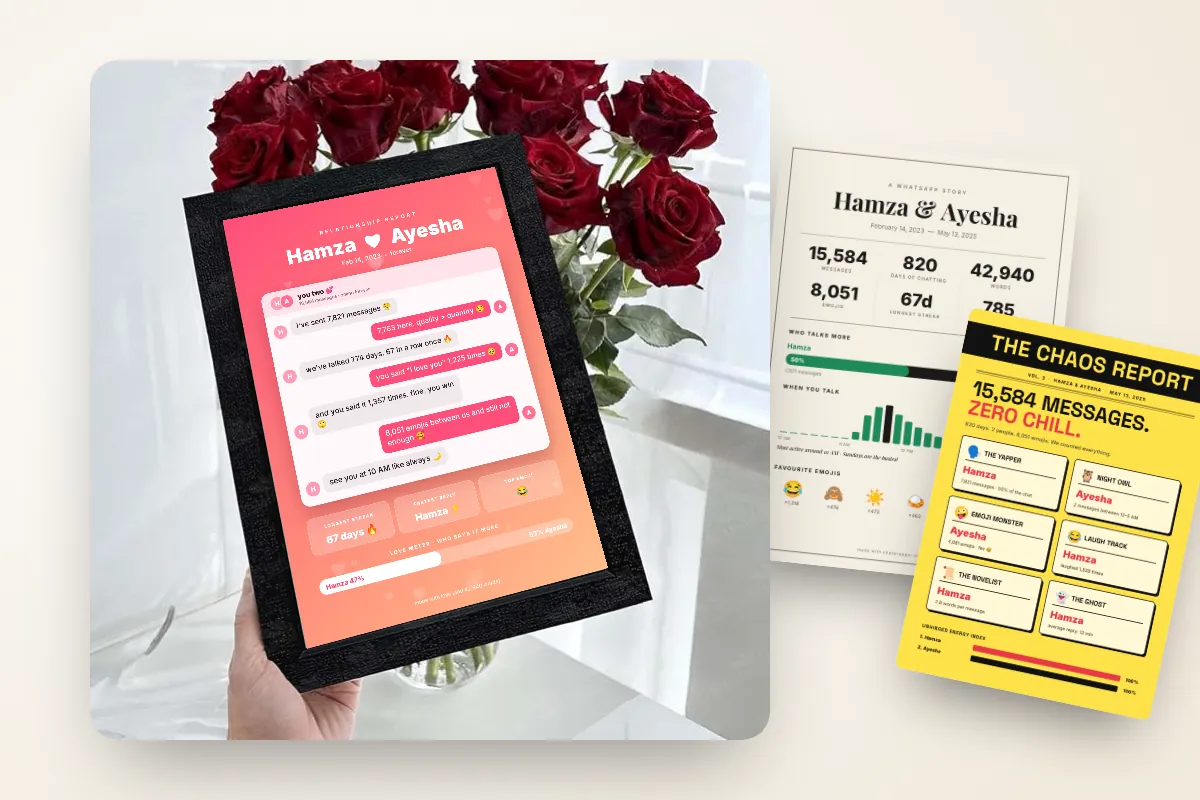
- See your numbers. Total messages, words, emojis, days of chatting, longest streak, busiest day, peak hour, who texts more, first message, "I love you" count, top emojis and reply times.
Privacy matters here, because chats are personal. ChatWrapper reads the file inside your browser on your own device. The chat is never uploaded and your messages are never stored. The final poster shows only stats and highlights, not your conversation.
Turn your WhatsApp chat stats into a poster to post
The "who texts more" reveal has become a proper social trend, with couples and friends posting their numbers on Instagram stories and TikTok and letting the comments pick sides. If you want to join in, checking who texts more on WhatsApp is the stat that gets the most reactions.
With ChatWrapper you pick a design and download it as a PNG for social media or a print-ready PDF. There are 15 designs, from the free Classic Stats and The Rewind to premium options like Sweethearts, a chat-bubble relationship report, and The Chaos Report, which hands out awards for group chats. Everyone gets 2 free posters, so you can try it before deciding on anything else.
If you would rather see your whole year in one go, a WhatsApp Wrapped style poster rounds up the numbers like a year-end recap. And if the stats are too good to keep on a phone, framed prints can be requested and delivered to your door in Pakistan in about 10 to 15 days.
The verdict
WhatsApp chat statistics will not tell you whether a relationship is working. They will tell you who says "ok", who stays up until 2 AM and who has kept the good morning streak alive. That is more than enough for a laugh and a great post. Export your chat, see your numbers and let the comments decide who really texts first.


