

Matching couple wallpapers are the quietest way to say "we're a pair". Nobody else needs to notice, but every time you both unlock your phones, the two halves still belong together. And if your jaan is in another city, it is a small daily reminder that the other half is out there on their screen.
Quick answer: the best matching couple wallpapers are two designs that each look good alone and complete each other side by side, like pink and blue neon, a sun and a moon, or one heart split across two phones. Add your names and your together-since date and they stop being generic. You can make a personalised pair for free on ChatWrapper in about two minutes.
What makes a good matching pair
A lot of his and hers wallpapers online are just one picture cut down the middle. On a real phone, that usually means half a face and a clock sitting on someone's nose. A good pair works a little harder.
- Each half stands alone. Her wallpaper should look finished on her phone even if his phone is in another country.
- Together they tell one story. Two colours, two symbols, or one picture that joins when the phones touch.
- It is personal. Your names, your date, or your own numbers beat a stock photo of strangers holding hands.
- It respects the clock. The top third of a lock screen belongs to the time and widgets, so the design should sit around it.
12 matching couple wallpapers to try
Every idea below can be made with just two names and a date. The last few can also use your WhatsApp chat for real numbers.
1. Neon Love (pink and blue)
The classic his and hers look: a glowing pink neon sign on her phone and a blue one on his, each with a name. It looks great on dark mode and on OLED screens, where the black background really stays black.
2. Sun & Moon
One of you is the morning person, the other is up at 2 am. A warm sun on one phone and a soft moon on the other suits almost every couple, and it is a lovely fit for long-distance partners living in different time zones.
3. Lock & Key
A padlock for one phone and the key for the other. Simple, a little cheesy in the best way, and easy to read at a glance.
4. Player 1 & Player 2
For couples who met over a game, or still fight over the controller. Retro pixel style, one "player" per phone, with your names on the start screen.
5. Two Halves (a heart that joins)
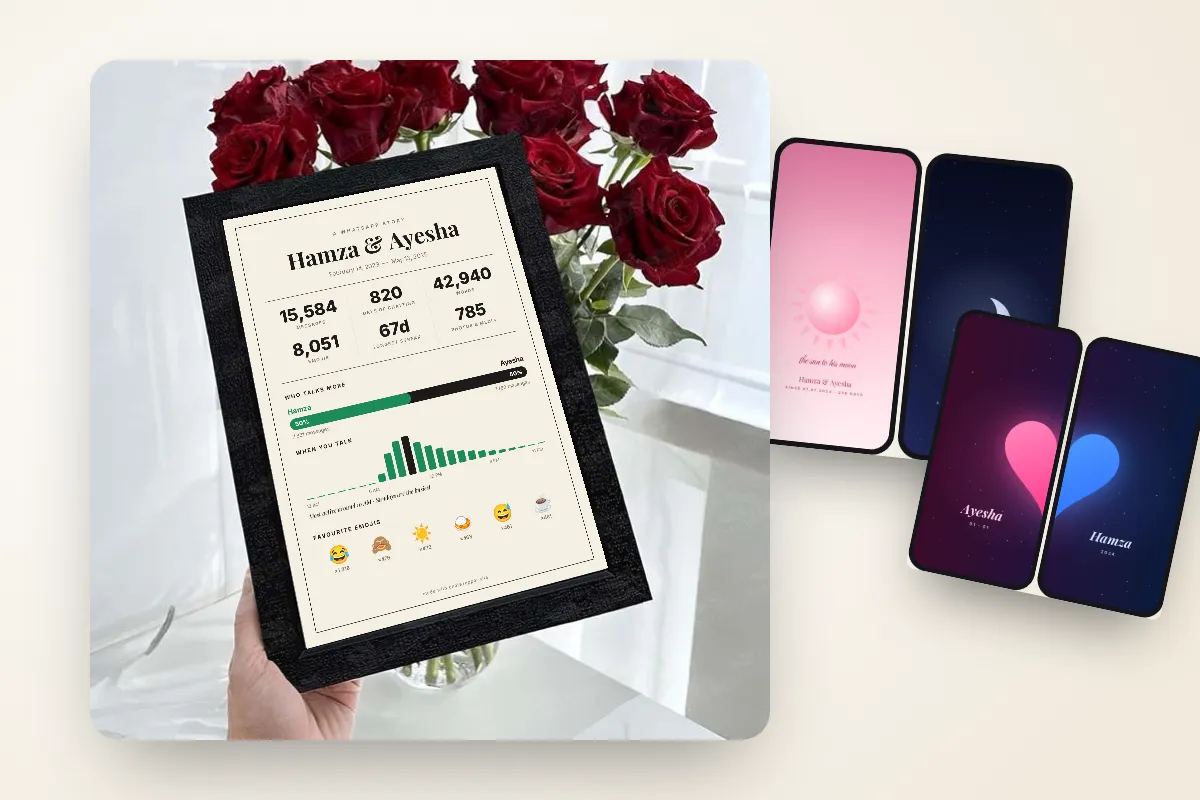
This is one of ChatWrapper's new couple sets. Her phone shows the pink half of a heart and his shows the blue half. Put the two phones side by side and the heart becomes whole. Try it at your next dinner out and watch your friends reach for their own phones.
6. Red String
Based on the red string of fate: an invisible thread that ties two people who are meant to meet. The red string runs across both screens and only makes full sense when the phones are next to each other.
7. Connected
A Wi‑Fi style screen that reads "Connected to" and your partner's name. It is subtle enough for people who do not want hearts on their phone, and anyone who looks closely will get it.
8. Minimal initials and date
Just your initials and the date you got together, set in clean type. It is the easiest pick for someone who wants a matching lock screen for couples without anything that looks romantic from across a room.
9. Photo-based wallpapers
Your favourite picture together, one for each phone. Choose a photo with empty space at the top, like sky or a plain wall, so the clock does not land on your faces.
10. Typing…
Made from your WhatsApp chat. Each phone shows the other person "typing…", along with how many messages they have sent. It is sweet, a bit funny, and very true to life.
11. Who Loves More
Also made from your chat. Each phone shows that partner's "I love you" count, and one love bar runs across both screens. Expect a friendly argument about who is winning.
12. Our Streak
One flame runs across both phones, showing your longest daily streak of texting each other. Great for couples who have not missed a day in months.
| Style | Best for | Needs your chat? |
|---|---|---|
| Neon Love, Player 1 & 2 | Fun, bold couples | No |
| Sun & Moon, Lock & Key | Classic his and hers wallpapers | No |
| Two Halves, Red String, Connected | Phones that join side by side | No |
| Initials and date | Low-key, minimal taste | No |
| Typing…, Who Loves More, Our Streak | Real numbers from your chat | Yes |
How to make couple wallpapers with names in 2 minutes
You do not need design apps or a designer friend. The matching couple wallpapers maker on ChatWrapper does it for you, and every wallpaper design is free.
- Add your names and date. Type both names and your "together since" date. That is enough for most designs.
- Add your chat (optional). For Typing…, Who Loves More and Our Streak, add your exported WhatsApp chat. It is read inside your browser on your own device and never uploaded.
- Pick a design and download. Each set has a version for her phone and one for his, sized for lock and home screens. Guests can download one wallpaper; with a free account you can download as many as you like, including all four files of a couple set in one go.
Not sure which style to pick? Browse all the couple phone wallpapers in the gallery first and send your favourites to your partner to vote on.
How to set a lock screen wallpaper on iPhone and Android
These cute couple wallpapers for iPhone and Android download as normal images, so first save them to your Photos or Gallery app.
iPhone
- Open Settings and tap Wallpaper, then Add New Wallpaper.
- Tap Photos and choose your wallpaper. Adjust it if you like, then tap Add.
- Tap Set as Wallpaper Pair to use it on both screens, or Customize Home Screen to pick a different image for the home screen.
Apple's guide to changing your iPhone wallpaper covers extra options like widgets and fonts.
Android
- Open the wallpaper in your Gallery or Photos app.
- Tap the three-dot menu and choose Set as wallpaper (on some phones it says Use as).
- Choose the home screen, the lock screen, or both, then confirm.
Menu names change a little between Samsung, Pixel, Xiaomi and other brands, but the option is almost always in that three-dot menu. You can also long-press an empty spot on your home screen and open the wallpaper settings from there.
Tips for a matching lock screen for couples
- Keep the clock area clear. The time, date and widgets sit at the top of the lock screen. Pick designs with the main artwork in the middle or lower half.
- Use two versions. Put the version with names and date on the lock screen, and a calmer version on the home screen so your app icons stay readable.
- Turn off depth effects if text gets hidden. On iPhone, the depth effect can push parts of the image in front of the clock. If a name gets covered, switch it off while editing the lock screen.
- Test the join. For side-by-side sets like Two Halves and Red String, put both phones together and check they line up before showing everyone.
- Change it for special days. Swap in a fresh pair for your anniversary, Eid, or your nikah date.
Take it off the screen too
Matching couple wallpapers are a small daily gesture. If you want something you can frame and hang on a wall, the same chat can become a full poster of your story: total messages, your first message, your longest streak and how many times you said "I love you". You can turn your WhatsApp chat into a poster, download it as a PNG or print-ready PDF, or request a framed print delivered in Pakistan.
For now, start small. Pick a pair, add your names, and see how long it takes your partner to notice.


